Restore any files
Puran File Recovery is a cost-free computer utility that empowers you to recover deleted or lost files and partitions. Regardless of the type of file system you’re aiming to examine, it can be seamlessly scanned as long as it is detected as a drive by Windows. These include hard disks, pen drives, memory cards, mobile phones, CDs, DVDs, and even formatted disks.
Top Recommended Alternative

Puran File Recovery can basically retrieve data from any storage medium available. With a straightforward interface and robust recovery engine, you can quickly and accurately bring back desired documents. This is a professional alternative for TestDisk.
Feature-rich solution
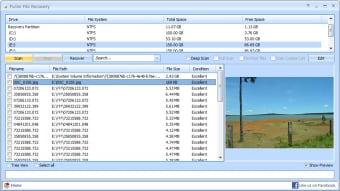
Puran File Recovery offers three different scanning processes that you can use to look for specific removed items. The first one is Quick Scan which rapidly lists down all the deleted files that you have with one click and under a few seconds. If you wish to detect high-speed listing with more deleted and lost files distinguished, Deep Scan is the smarter examination process to perform.
Lastly, the Full Scan can determine eliminated or misplaced partitions. This even brings you the ability to regain data from formatted drives. Not to mention, it supports scanning of RAW and Physical drives as well. Additionally, both Deep and Full Scan methods allow you to discover numerous format files based on data patterns. In fact, it includes more than 50 data pattern lists that are expandable to hundreds of formats.
Apart from an executable file, this desktop suite provides a portable version that also requires no installation for usage and can even run in a BartPE environment. Puran’s scanning and retrieving performance is truly remarkable however it does exhibit a fair share of downside like its outdated and unattractive user interface as well as recovery risks of fetching unwanted files again.
Scan and recover efficiently
Puran File Recovery is an essential PC software to keep. It can effortlessly save your day when you accidentally erased important data. No matter how long the file has been eradicated, this program can scan, detect, and retrieve irrespective of the storage medium you used to keep the documents. Its interface though should be overhauled to compete with the modern looks of similar tools.